Improve patient safety
Real-time insight and alerts for clinical risk.
 SecureObs
Secure clinical operations platform
SecureObs connects clinical observations, patient voice, family sharing, care planning, medicines, staff cover, safety escalation and analytics in one intelligent workflow. From hospital wards to individual homes, it helps teams focus on delivering safer, better evidenced care.
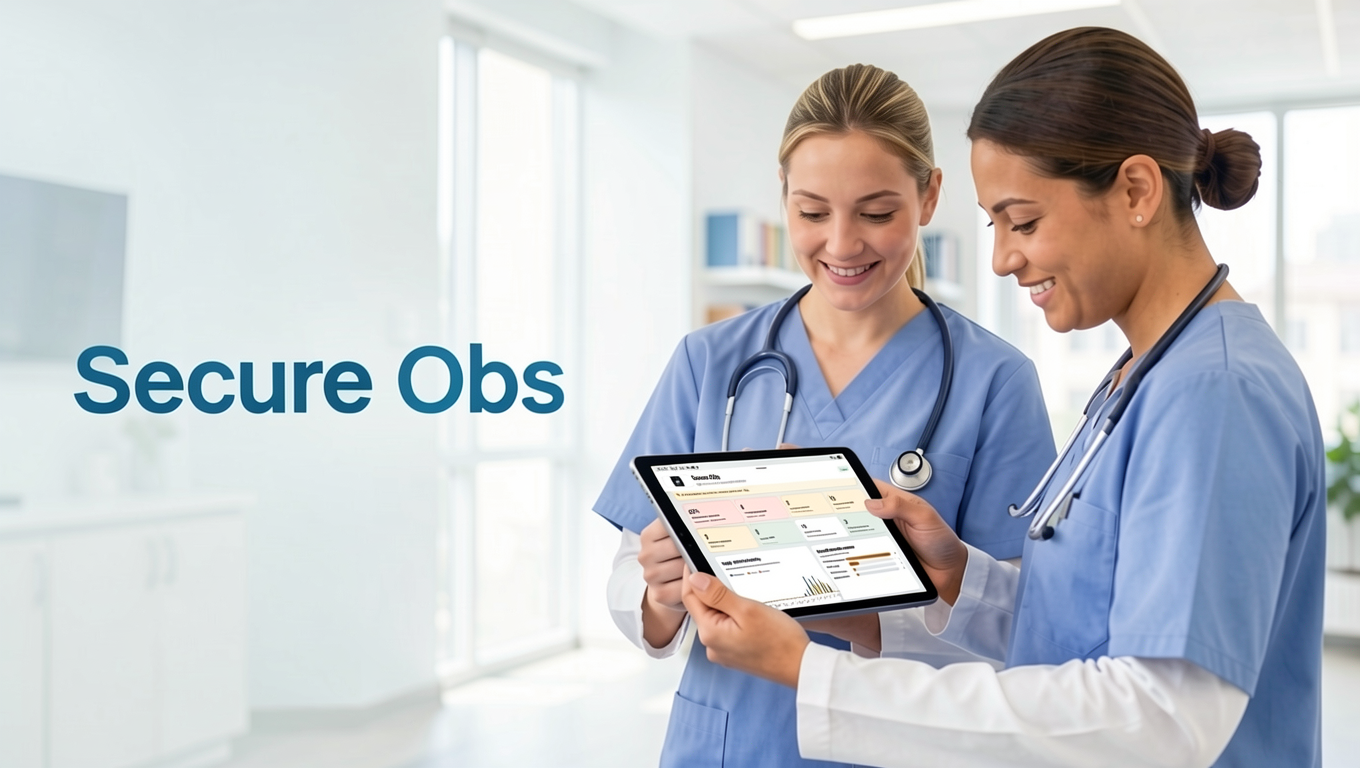
Watch SecureObs in action
Explore the platform in under four minutes—from NFC sign-in and offline working to clinical care, flexible packages and a supported rollout.
Real-time insight and alerts for clinical risk.
Streamlined workflows that reduce duplicate admin.
Built for audit trails, governance and clinical accountability.
Evidence-led decisions for better care planning.
Introducing SecureObs Home Care
Support people in their own homes with a dedicated workspace for continuous care and live-in staffing, alongside scheduled wellness checks.
Bring each home’s address, care needs, emergency contacts and staff cover together. Managers can oversee their authorised locations, while carers open the care records they need for the person they support.
Ask about a Home Care demoFrom the manager’s desk to the person’s home
Plan day shifts, waking nights, sleep-ins and live-in duty periods, with breaks and relief cover clearly recorded.
Carers check in to their assigned duty, record breaks and leave handover notes at check-out. Signing into the app alone does not mark a carer as present.
Schedule a check on someone’s wellbeing and record the outcome, including concerns or no answer, for the team to review and follow up.
Open existing patient notes, care plans, medication records and observations from the home location, with the same staff access controls.
Attendance updates require an internet connection and record the carer’s confirmation of arrival. Wellness concerns follow your organisation’s escalation procedure.
Built from real ward work
SecureObs is designed around repeated ward actions: identify staff, choose the patient, record the check, see what is due, and keep a reliable record when the ward gets busy.
Clear due times, patient status, NEWS2 summaries, recent missed observations and large touch targets for fast recording.
Start, review and end TESO episodes with reasons, observation level, ratio, seclusion status and plan of care history.
Regular, PRN, depot and rapid tranquillisation records with administration history, allergies, ADRs and prescribing controls.
Cutlery counts, room and locker checks, Level 1 checks, item-based security checks and printable patient assessment forms.
Nurse in charge, medication nurse, enhanced observation cover, gaps, auto-assignment and shift-based staffing visibility.
Temporary PIN access, virtual NFC codes, start and end windows, ward access and auditable assignment history.
Failed saves queue locally, retry individually, show sync status and avoid losing checks when ward Wi-Fi drops.
Sites, wards, feature switches, NFC formats, manager setup, session timeout, staff NFC tag writing and database-ready configuration.
Long-form signed notes with staff and date filtering, chronological review, multi-select and confidential PDF export.
Nursing templates for needs, risks, goals, interventions, patient preferences and review dates, with signed history and PDF output.
Patient-by-patient summaries bring together movements, presentation, nutrition, NEWS2, medication, incidents and outstanding tasks for the incoming shift.
Traceable ward and patient trends, attention prompts, underlying evidence tables and CSV or PDF export for operational review.
RAG-rated incidents, injury body maps, safeguarding context, assigned ownership, acknowledgement and documented resolution.
Patient priorities, regular experience check-ins and tightly permissioned family access with a reviewed contribution workflow.
A connected manager environment
SecureObs now extends beyond the ward tablet. Managers can review operational evidence, oversee patient movement and use secure desktop workflows without remotely mirroring an Android device.
CQC evidence and governance
Organise live evidence around Safe, Effective, Caring, Responsive and Well-led. Managers can review incidents, missed checks, NEWS2 coverage, care plans, tasks, handovers and security activity without presenting the result as a predicted CQC rating.
Desktop clinical workspace
Authorised staff can sign in through dedicated web pages, select an accessible ward and patient, and create patient notes or structured care plans that save to the same clinical record used by the ward tablets.
Patient movement governance
Manager-authorised actions require a recorded reason and confirmation. Returning patients can be restored without losing their SecureObs history, while every movement remains attributable in the audit trail.
Patient demographics and contacts
Record date of birth with a current calculated age, alongside optional next-of-kin name, relationship, telephone and email details. Contact information remains within the authorised patient record.
Bespoke by ward
SecureObs can be configured for a small care home that only needs observations and assessment forms, or for a secure hospital ward using NEWS2, TESO, medications, security checks and staff rota cover. Features are controlled per ward, so different services can use the same platform without carrying unnecessary screens.
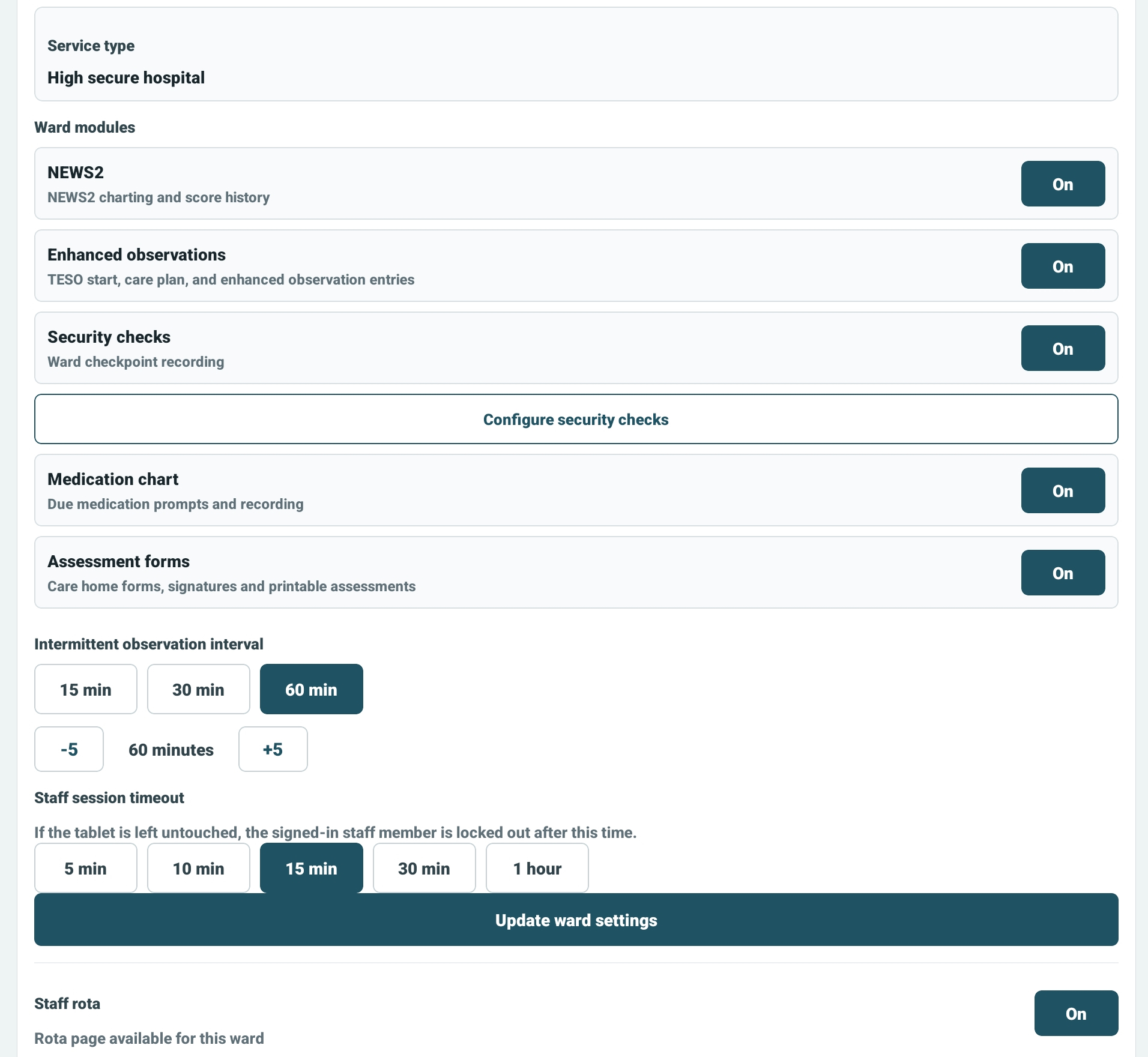
Enable only what the ward needs: NEWS2, enhanced observations, security checks, medication, assessments and rota.
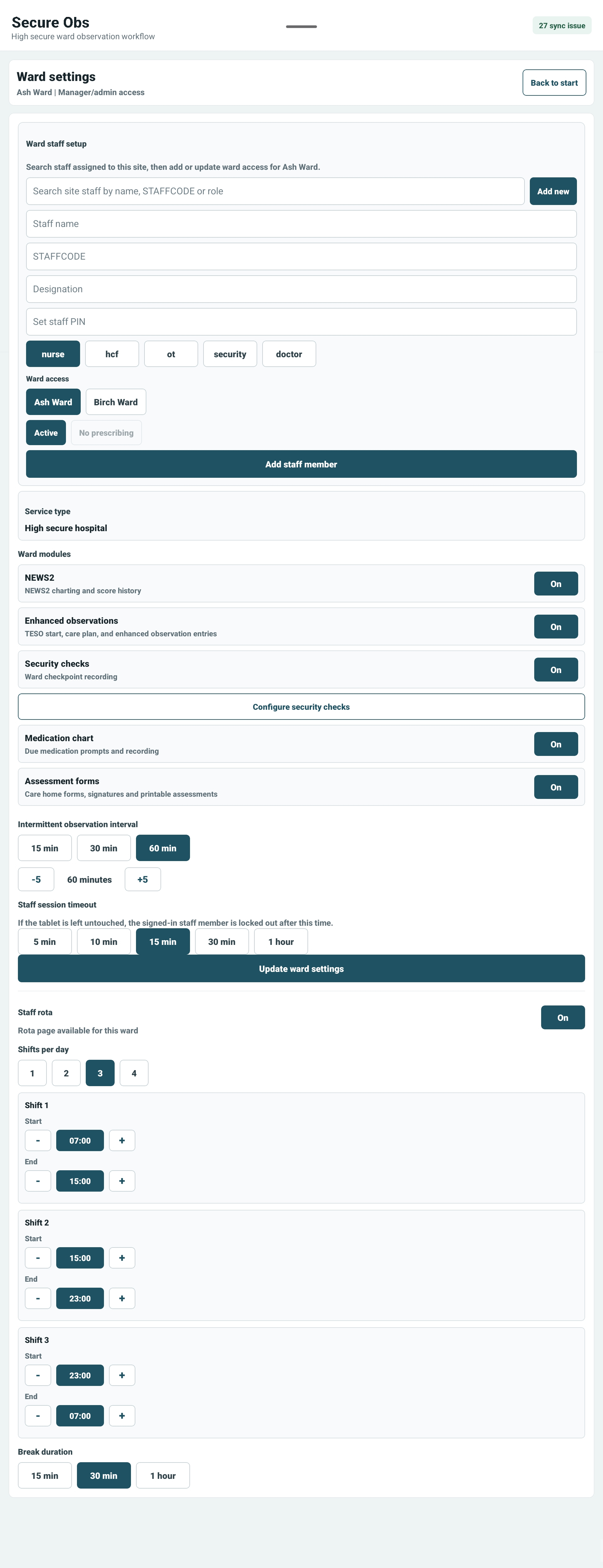
Managers can control staff access, write NFC staff tags, ward modules, observation timing, timeout, shift count and break duration.
Patient-centred records
Staff can select a patient, add detailed clinical information and review signed records without leaving the ward workflow. Selected notes and completed care plans can be printed or saved as confidential PDFs for an authorised clinical review.
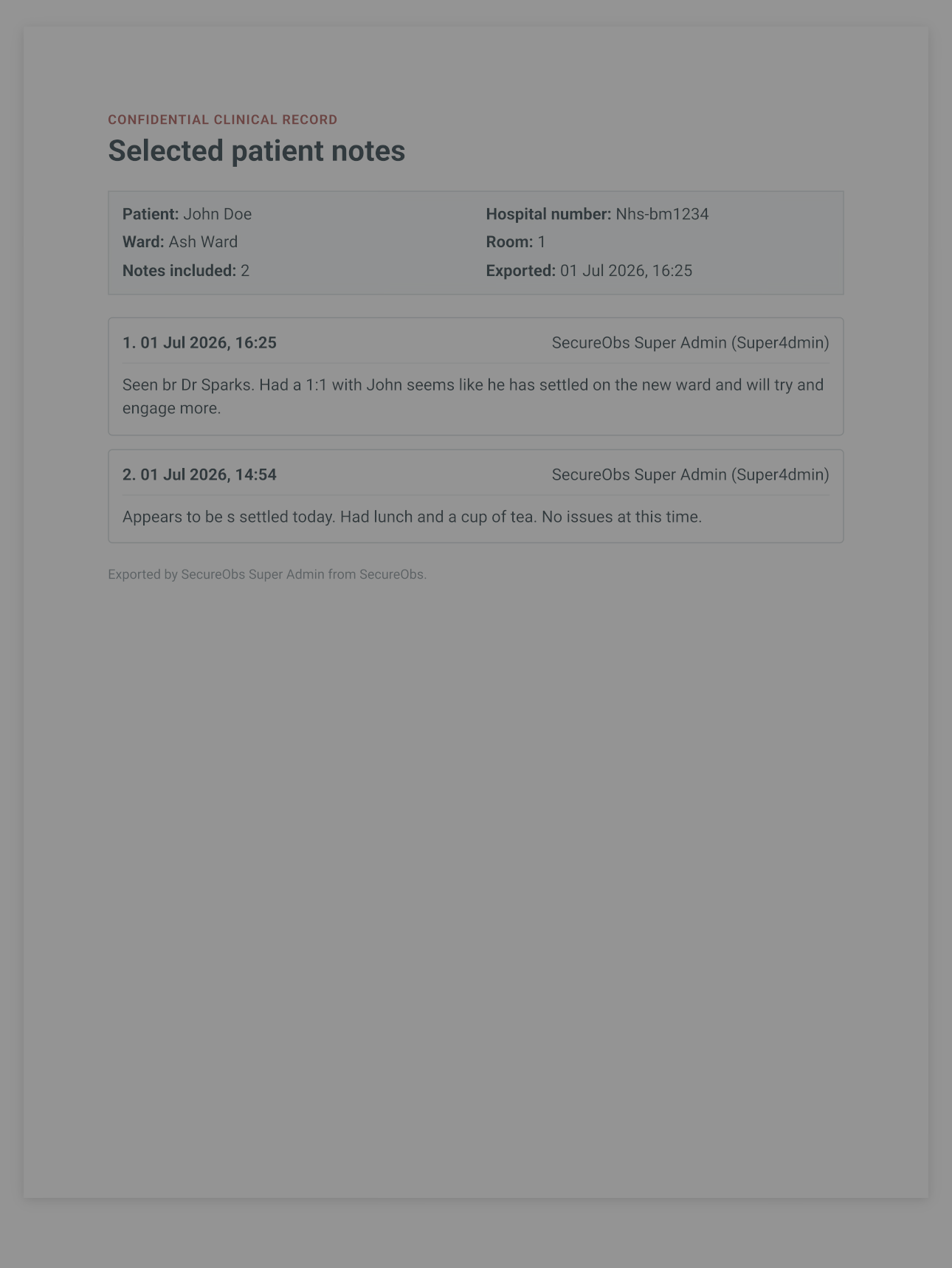
Record longer patient notes, filter the history by staff member or date order, select the entries needed and produce a clearly attributed confidential record for printing or sharing.
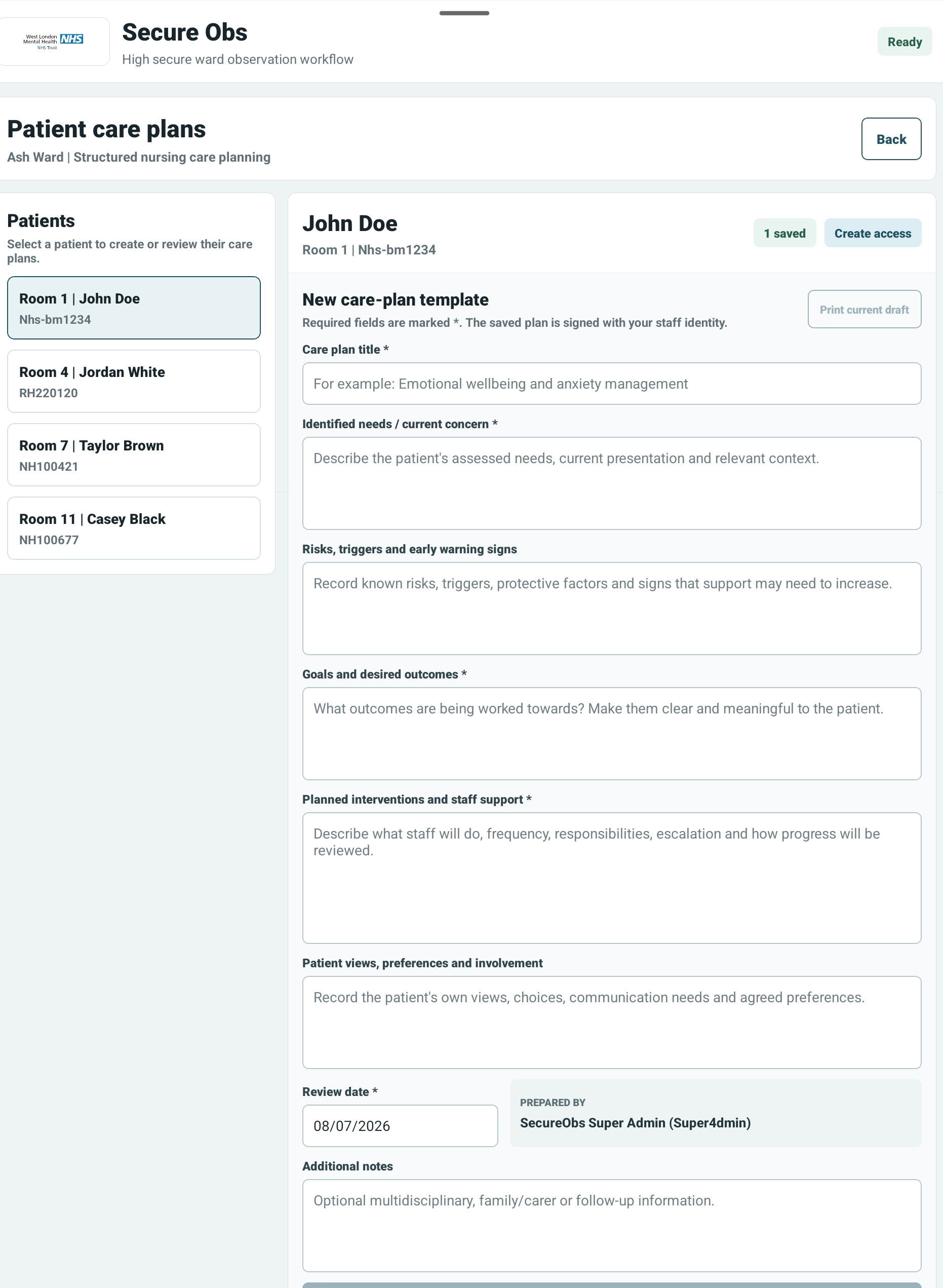
Capture assessed needs, risks and triggers, desired outcomes, planned staff interventions, patient views and review dates. Saved plans retain staff authorship and can be printed or shared as a PDF.
Patient voice and family shared care
Patients can record what matters to them, their goals, communication and accessibility needs, preferences and regular feedback about their care. Where the patient agrees, SecureObs creates a separate family website showing only the details approved for that named person.
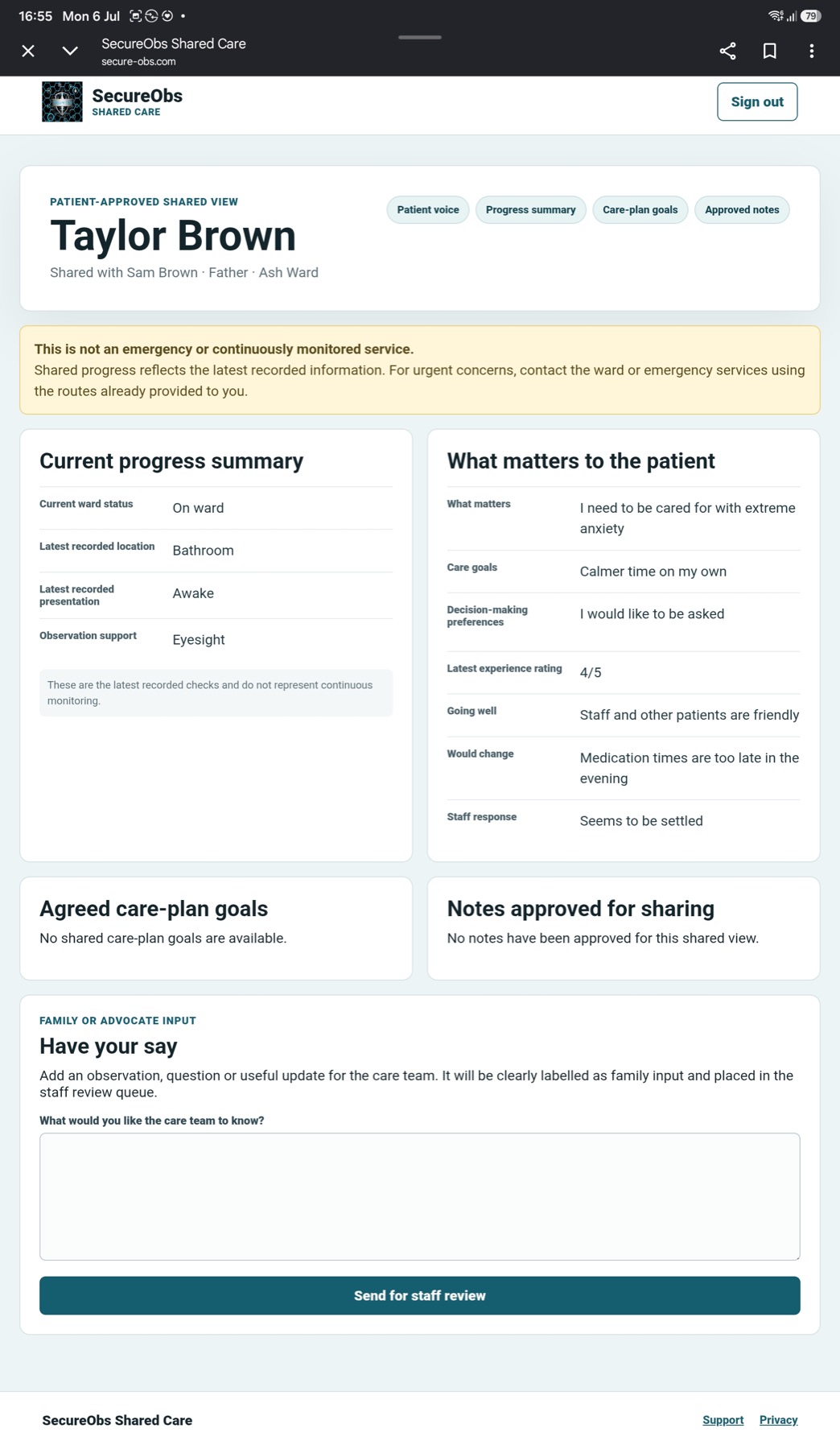
Relatives see the patient’s approved progress summary, what matters to them, agreed care-plan goals and specifically approved notes—never an unrestricted copy of the clinical record.
Ward intelligence without extra paperwork
SecureObs turns the records staff already make into practical ward oversight. The analytics dashboard highlights patterns and exceptions, while shift handover gathers the important patient detail into a structured summary that staff can review, add context to and sign.
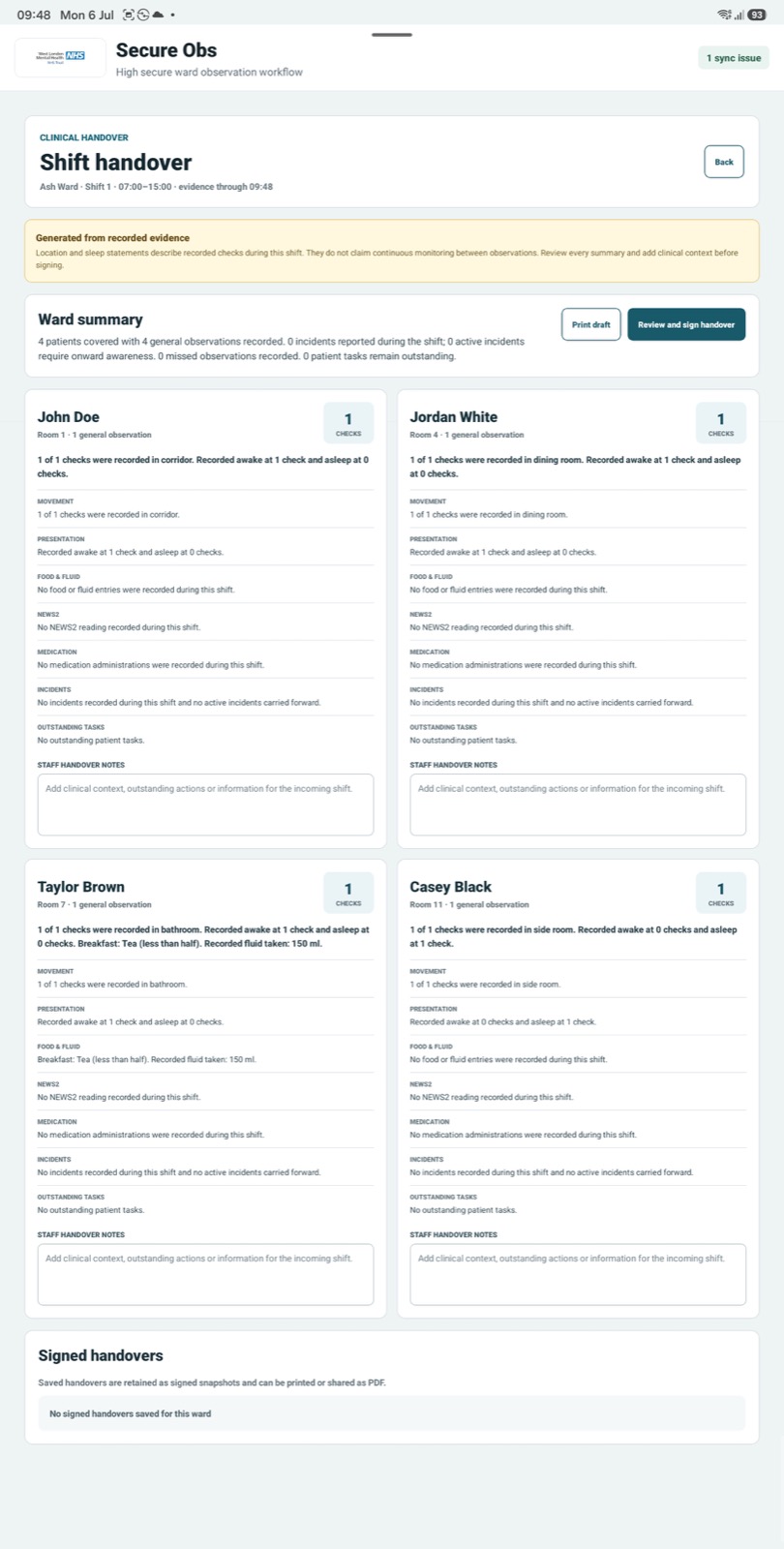
A clearer end to every shift
At the end of the shift, SecureObs creates a patient-by-patient view of recorded movements and locations, awake or asleep presentation, food and fluid intake, NEWS2, medication activity, incidents and outstanding tasks.
It remembers the important recorded details when the ward has been busy, helping the incoming team understand each patient quickly. Staff remain in control: every summary can be checked, clinical context can be added, and the completed handover can be signed, printed or shared as a PDF.
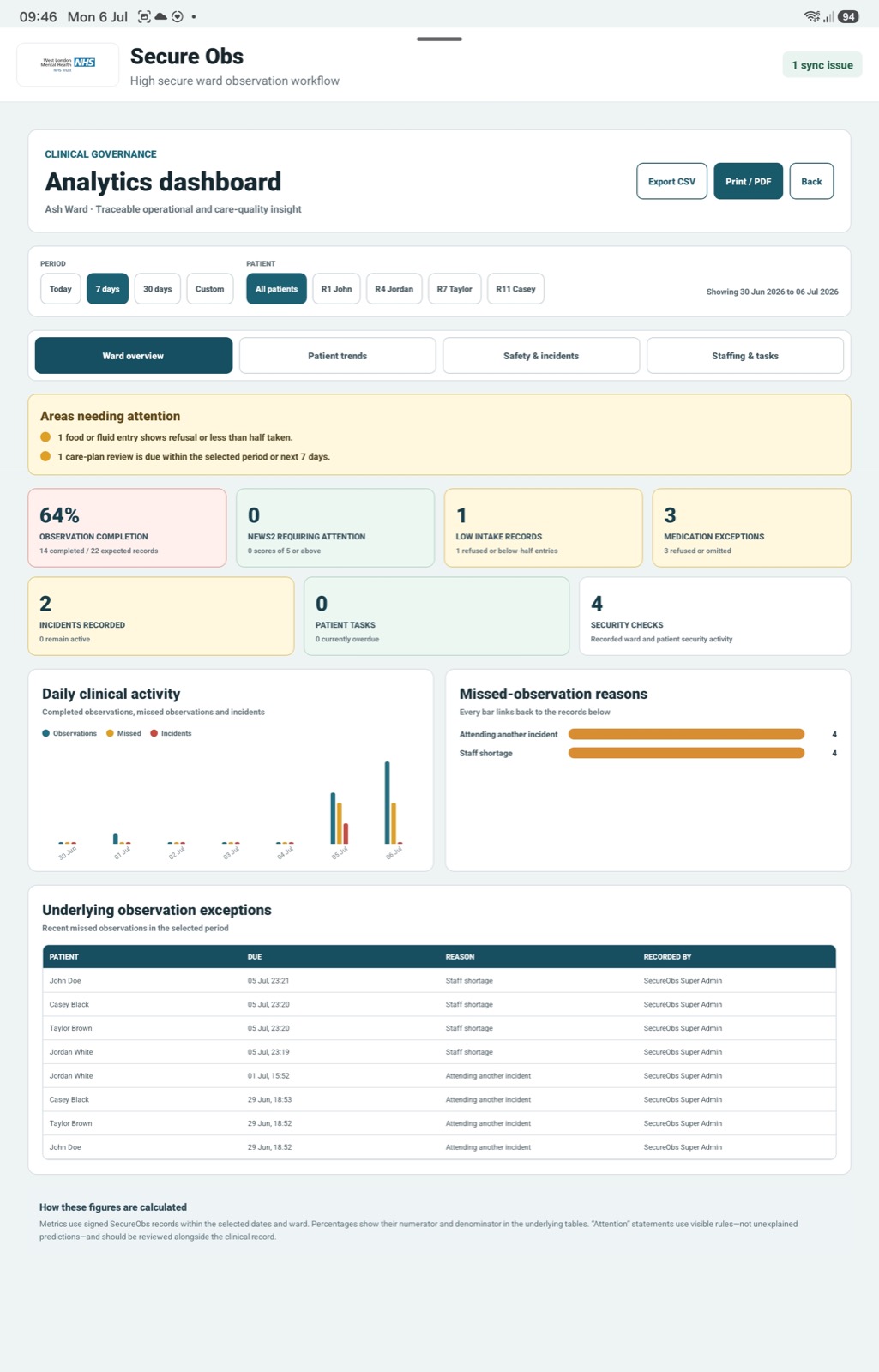
Traceable operational insight
Review observation completion, NEWS2 attention, low intake, medication exceptions, incidents, patient tasks and security activity by period or patient. Clear attention prompts, trend charts and underlying evidence tables help managers see where a closer review is needed.
Results can be exported to CSV or printed as a PDF, while visible calculation notes keep the figures understandable rather than presenting unexplained predictions.
Safety and escalation centre
Staff can record RAG severity, incident category, immediate action, the patient’s account and affected body areas. Ownership, acknowledgement and resolution are tracked in one review queue, with active concerns feeding the ward overview, analytics and shift handover. It gives the team an immediate picture of risk without hiding the detail needed for review.
Real tablet screens
These are live SecureObs screens: restrained, readable and practical, with the most important clinical and operational status visible without hunting through menus.
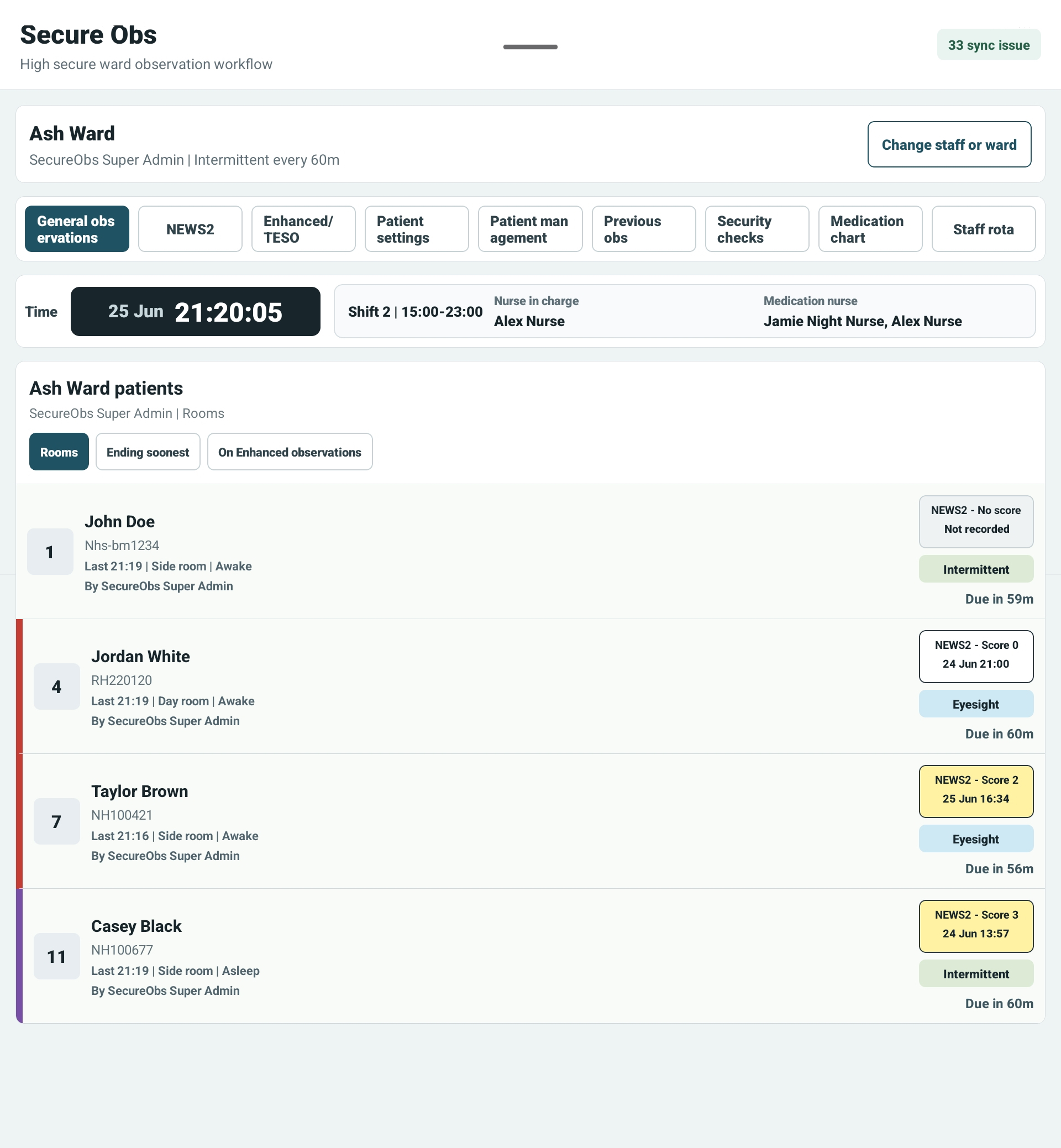
Due times, enhanced status, NEWS2 summaries, shift information, nurse in charge and medication nurse visibility.
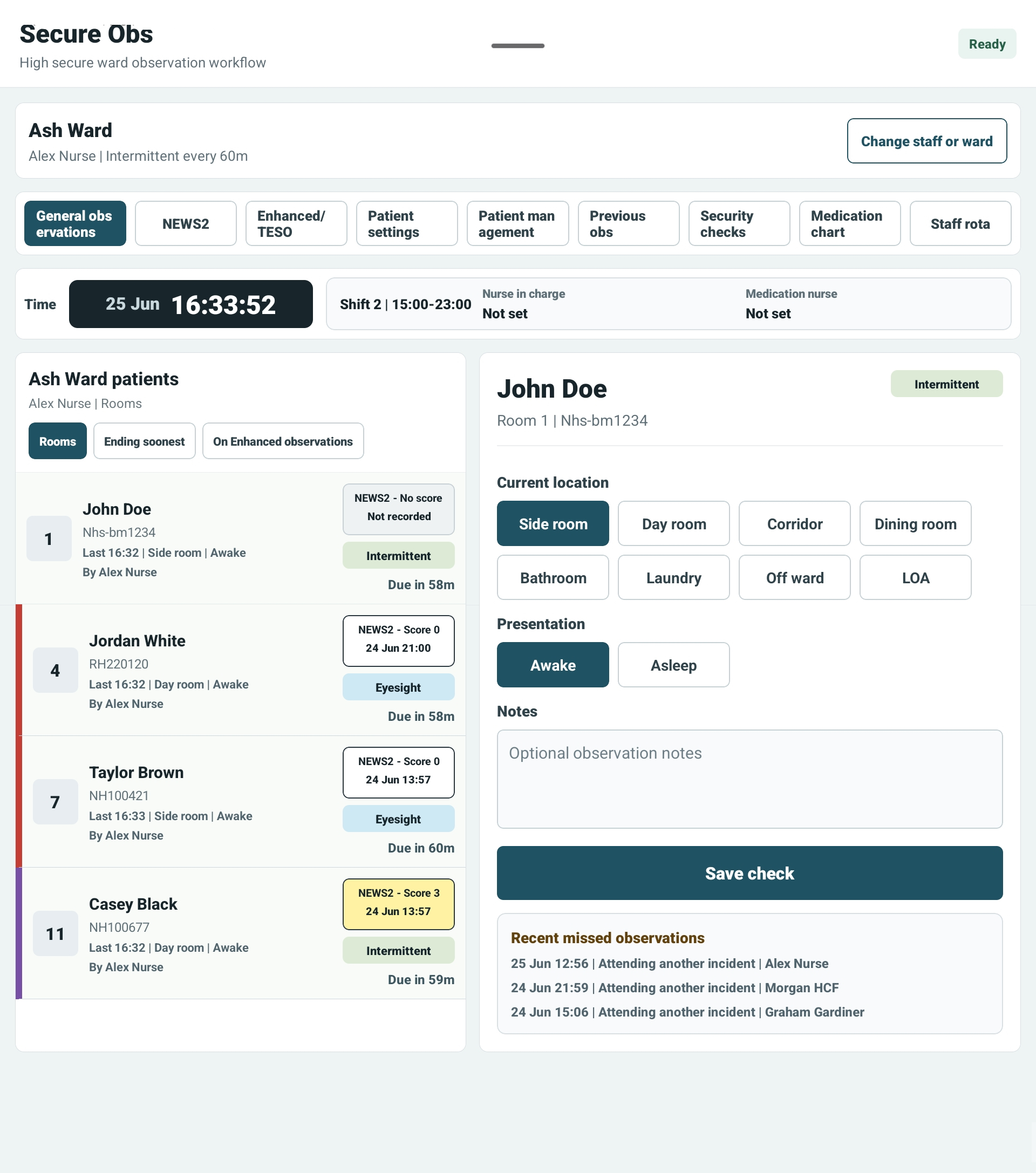
Location, presentation, notes and recent missed observations sit beside the patient list.
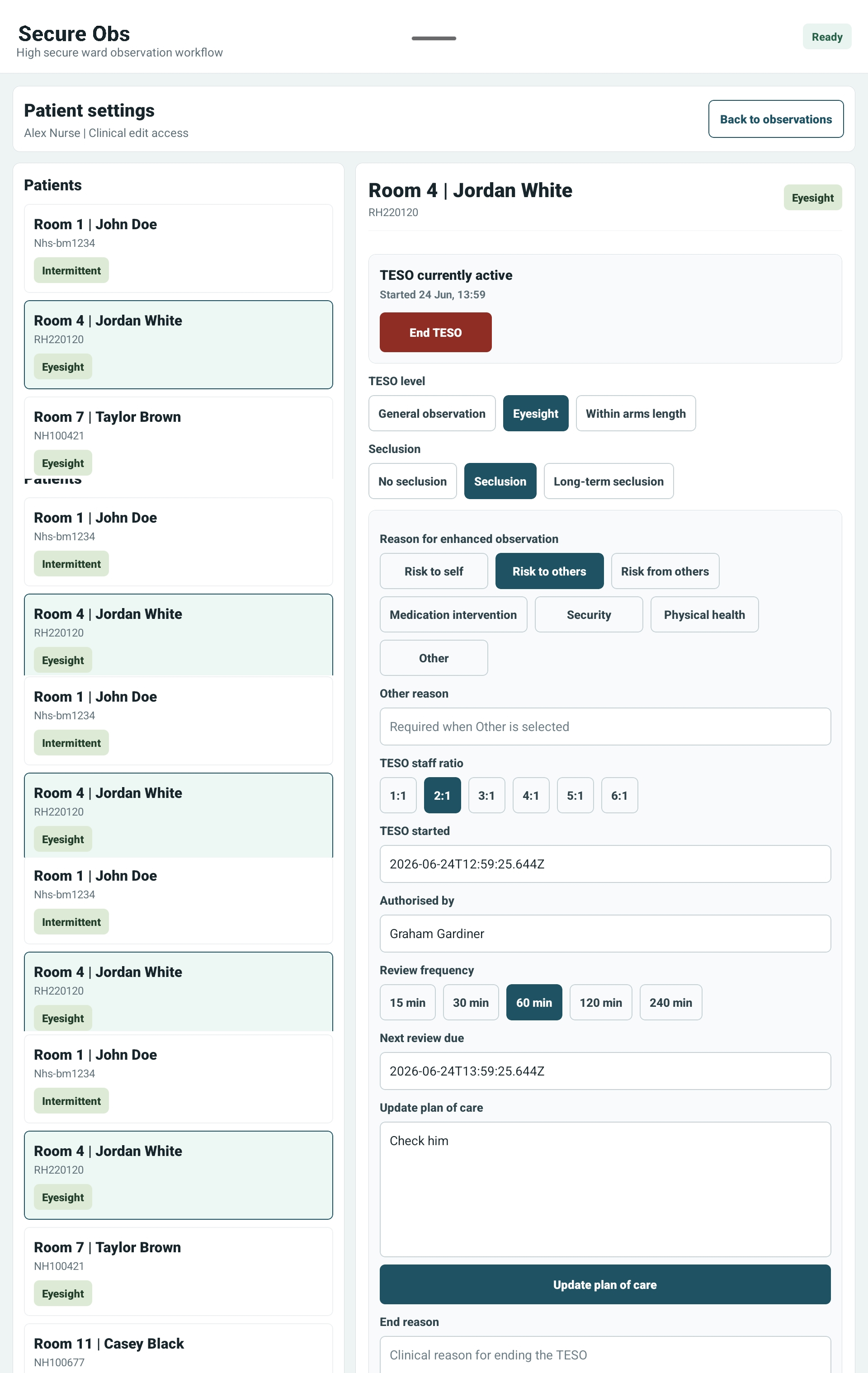
Observation level, seclusion, reasons, ratio, review frequency and plan of care in one clinical view.
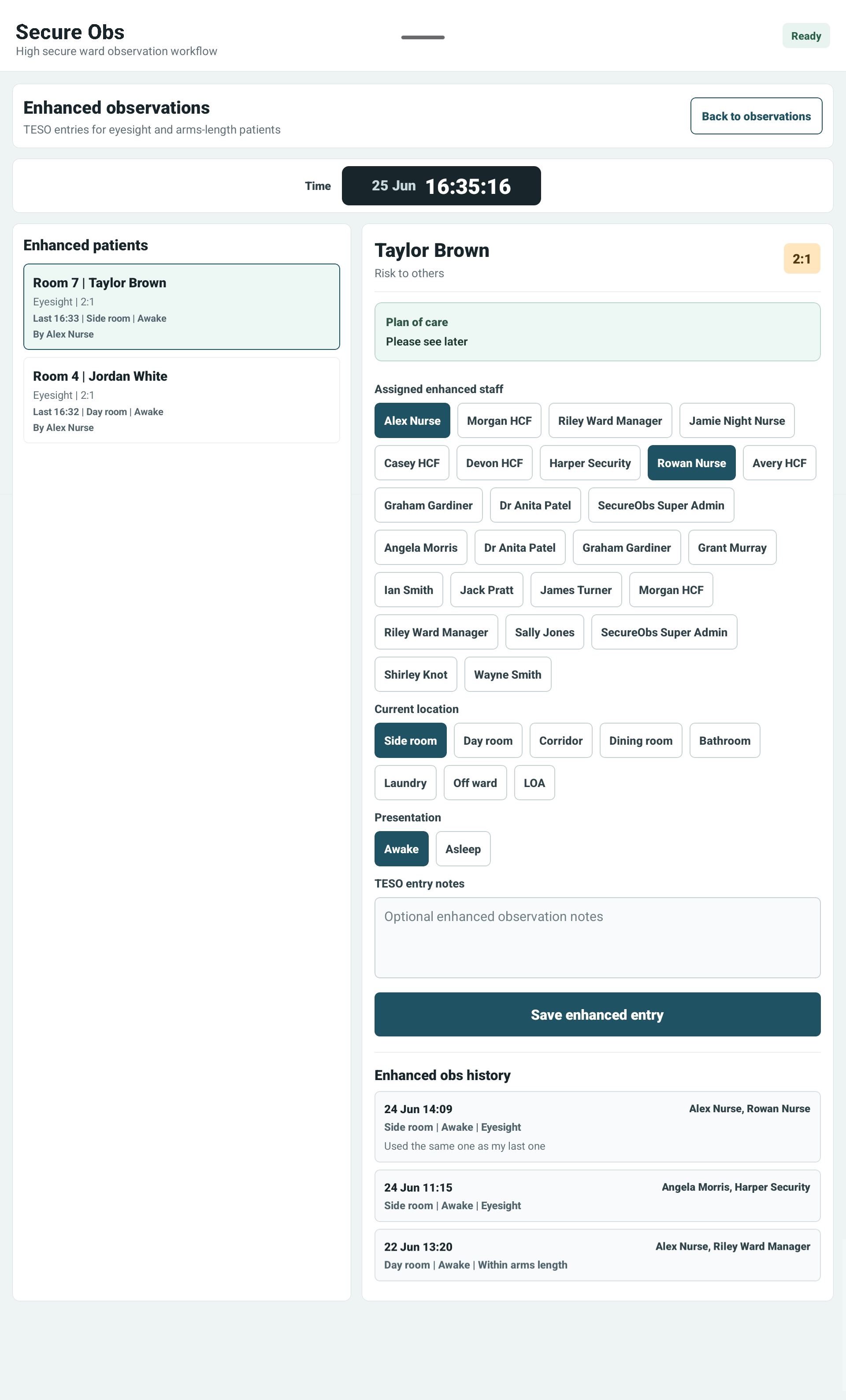
Dedicated enhanced/TESO recording with assigned staff and patient-specific observation status.
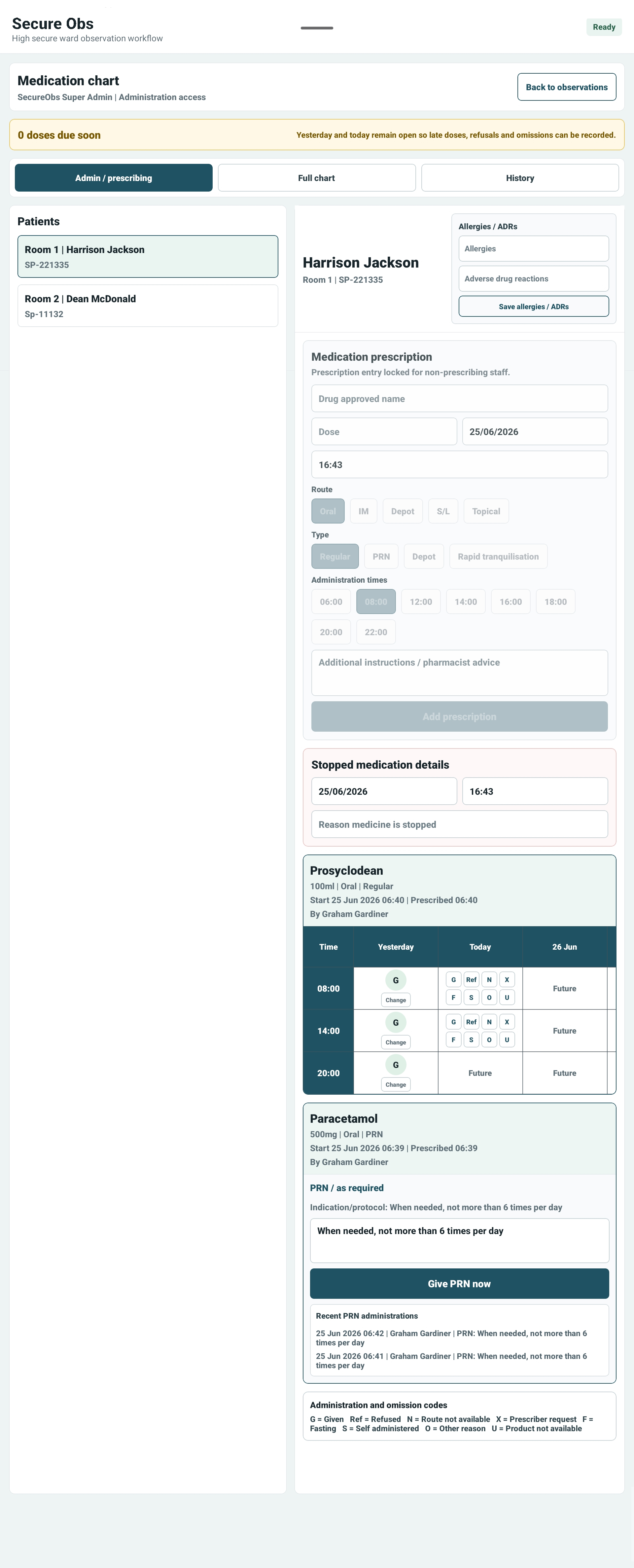
Prescribing, administration, omissions, PRN, depot and rapid tranquillisation workflows.
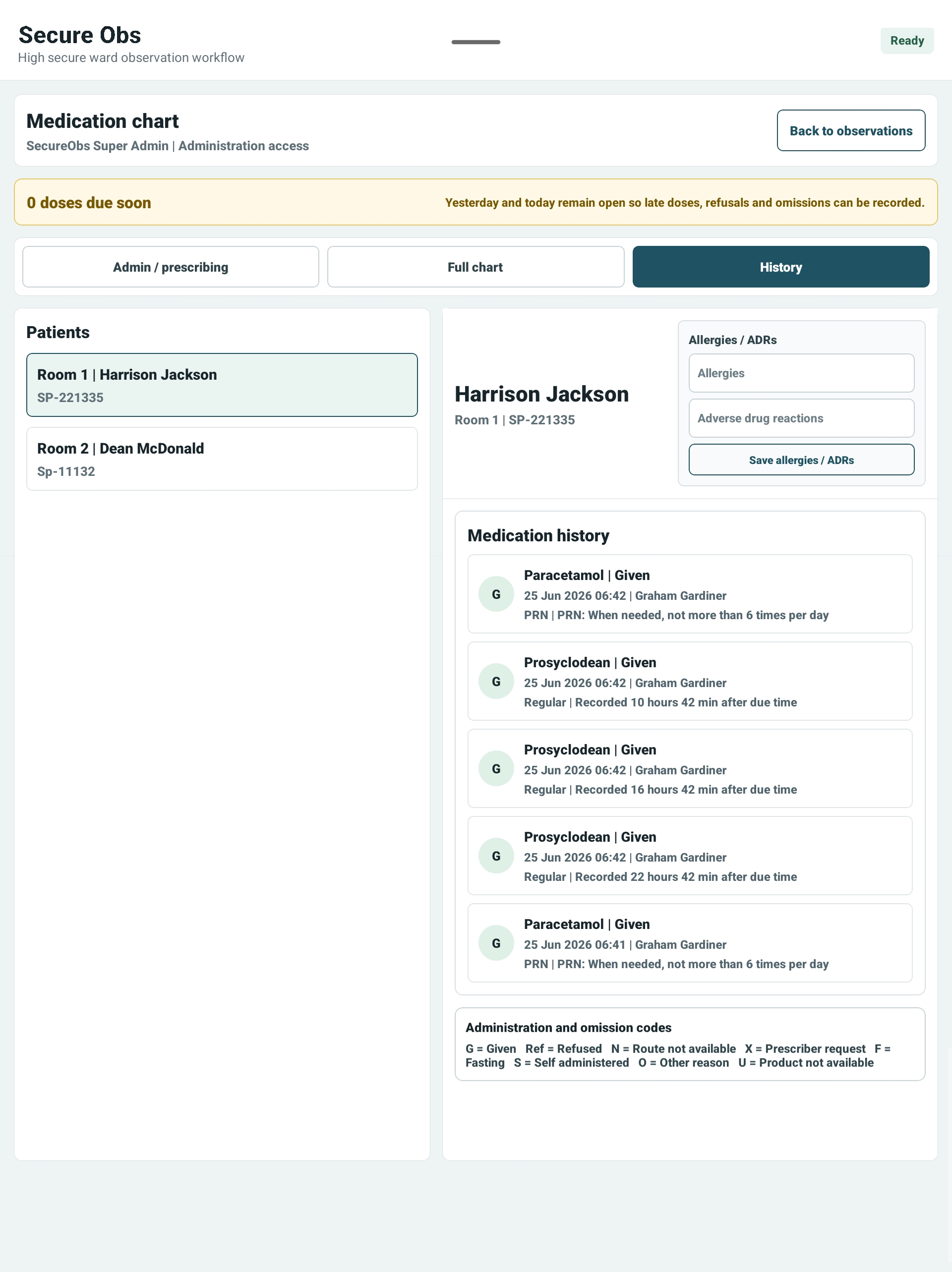
See what was given, refused or omitted, with a stronger record for clinical review.
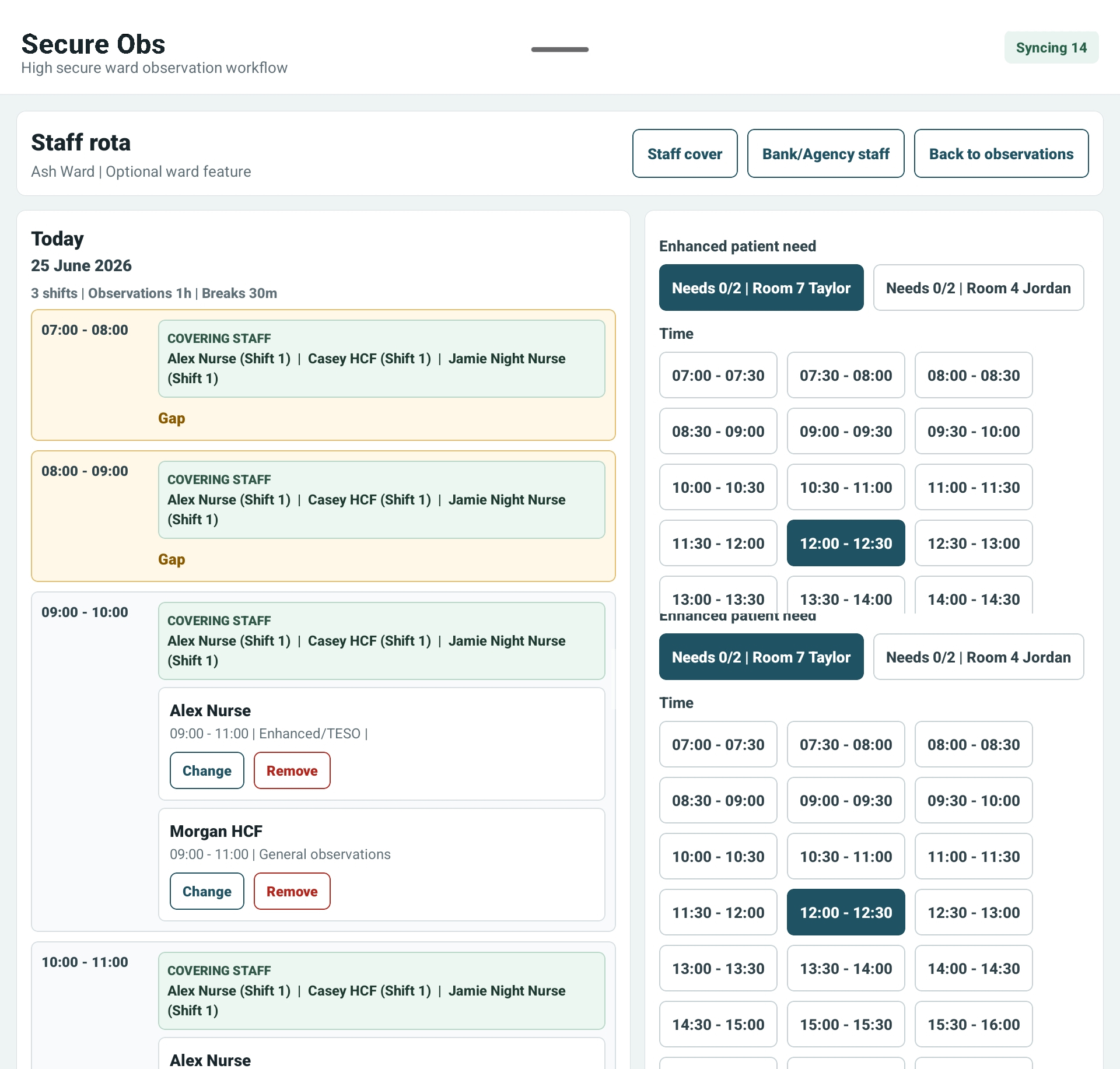
Shift cover, assignment by role, medication nurse awareness and enhanced observation coverage.
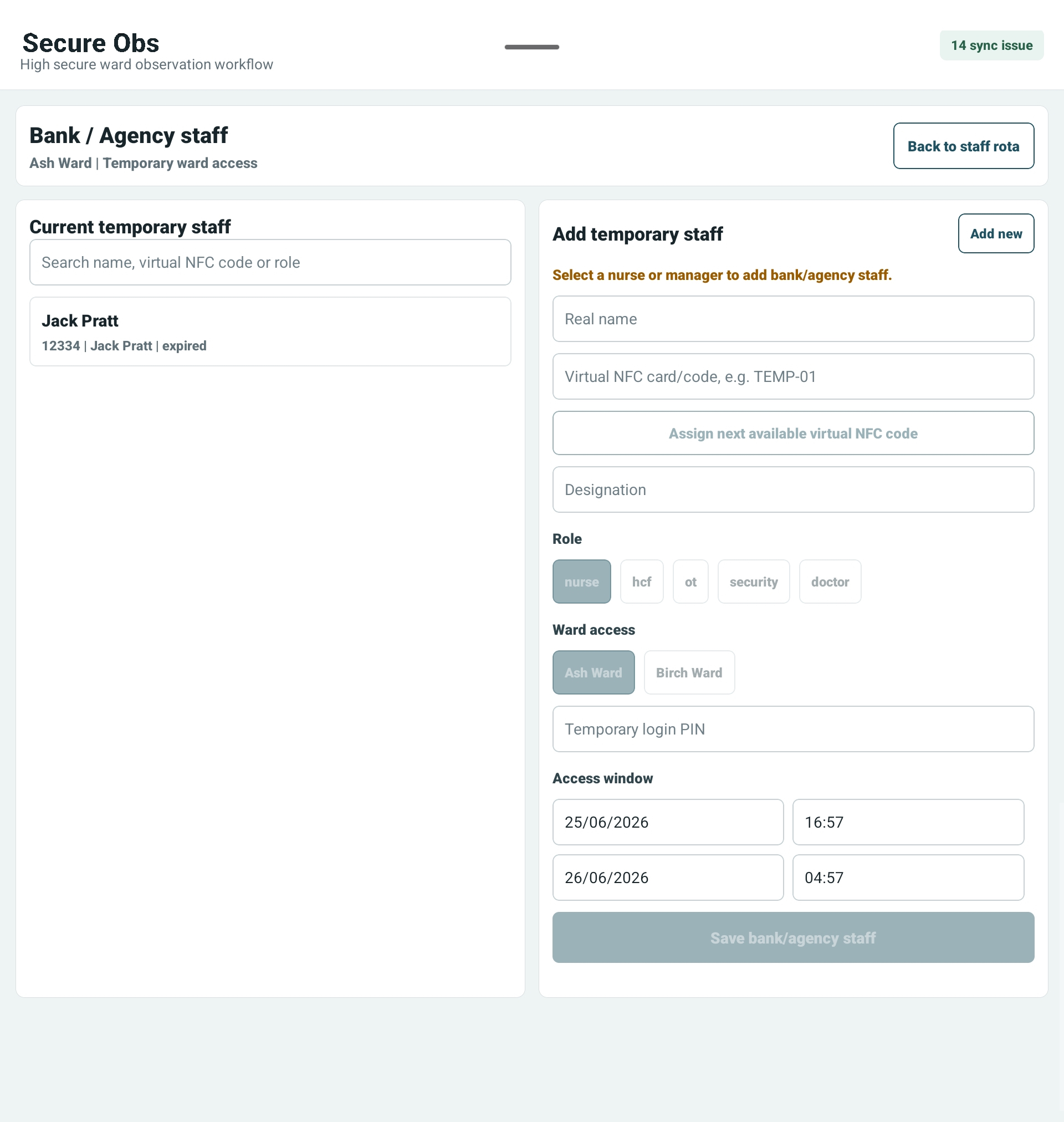
Temporary staff can be given real-name access tied to a virtual NFC code and expiry window.
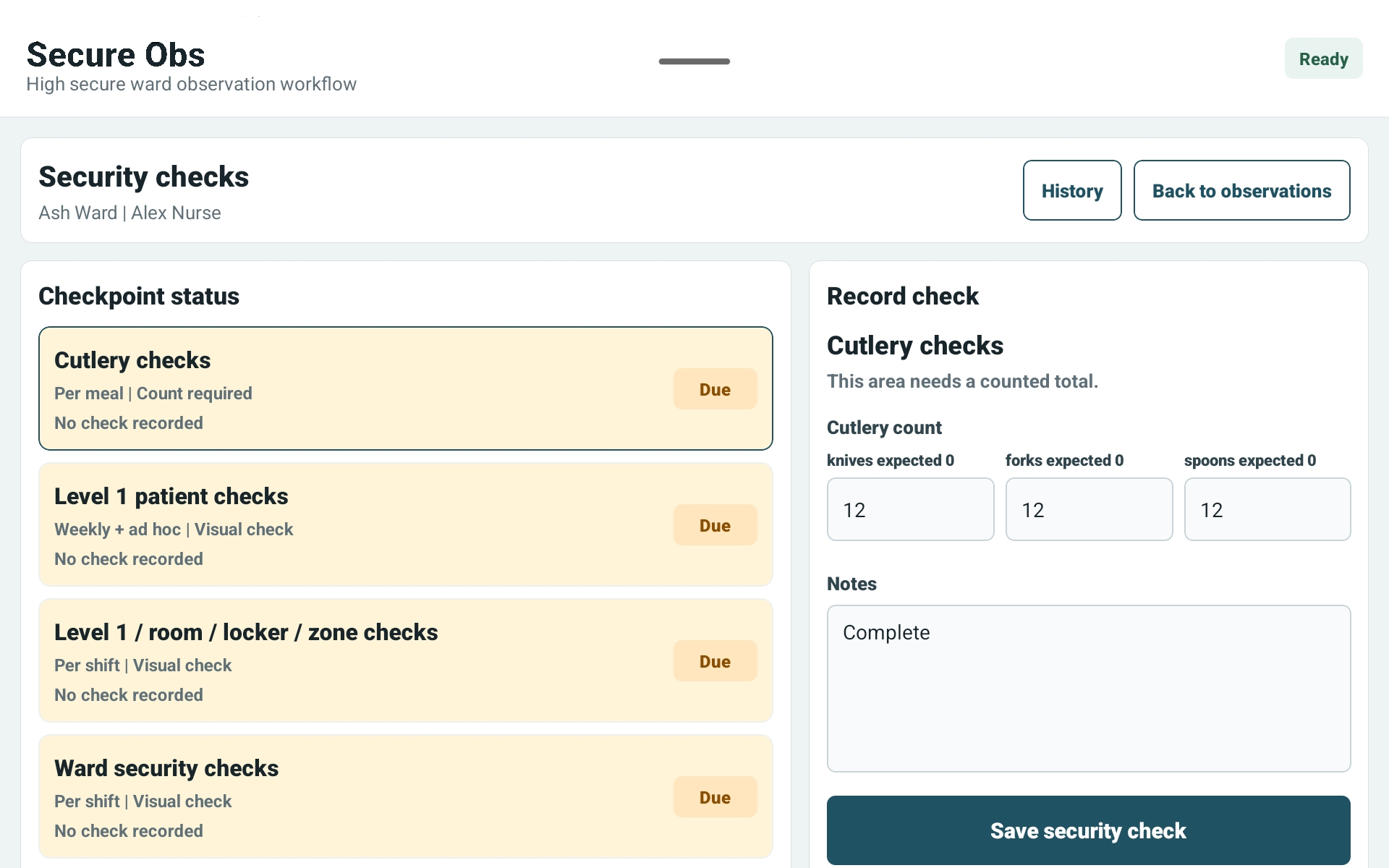
Counted cutlery checks, ward checks, patient checks and configurable security tasks.
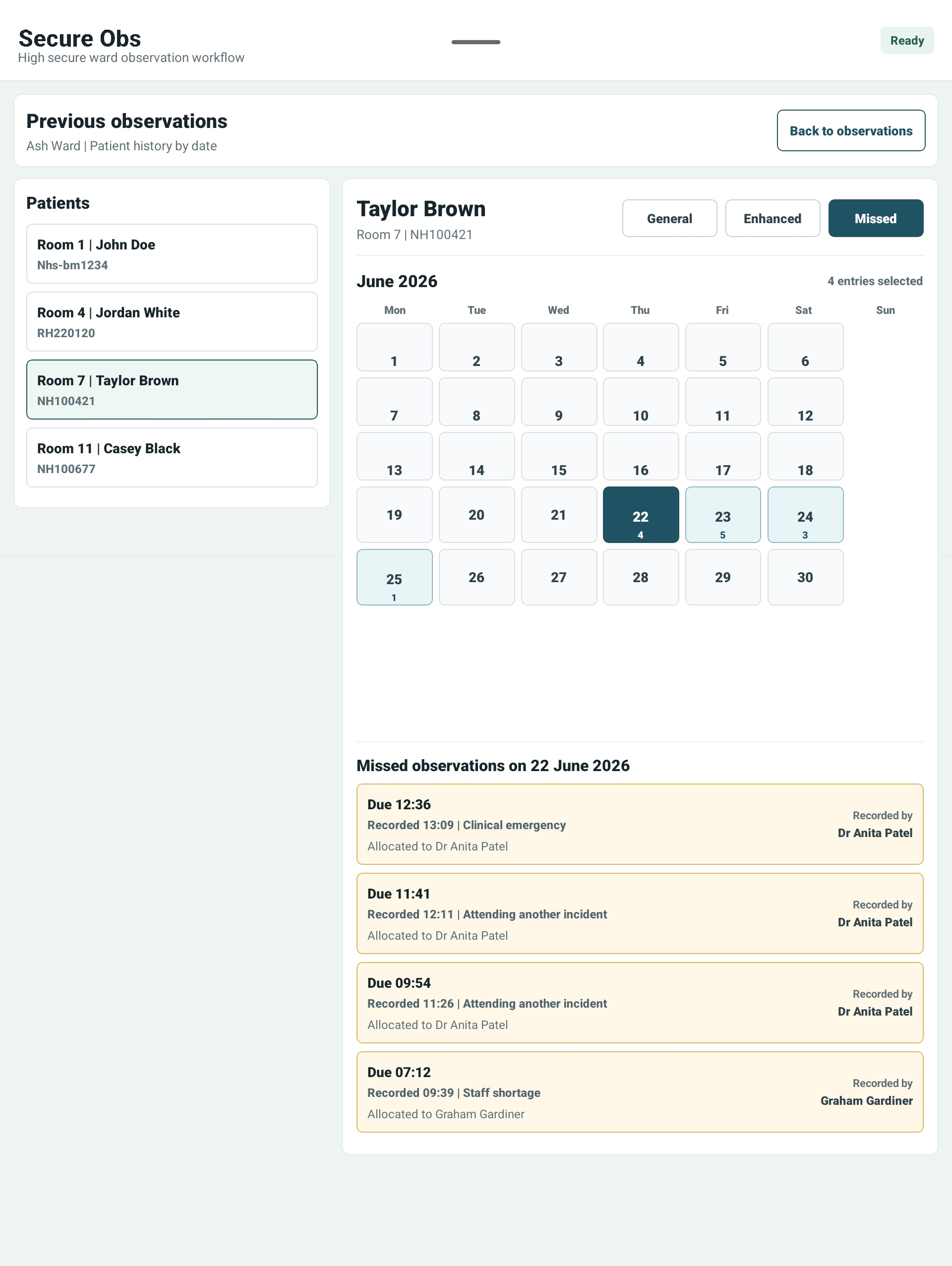
Review general, enhanced and missed observations by date, patient and reason.
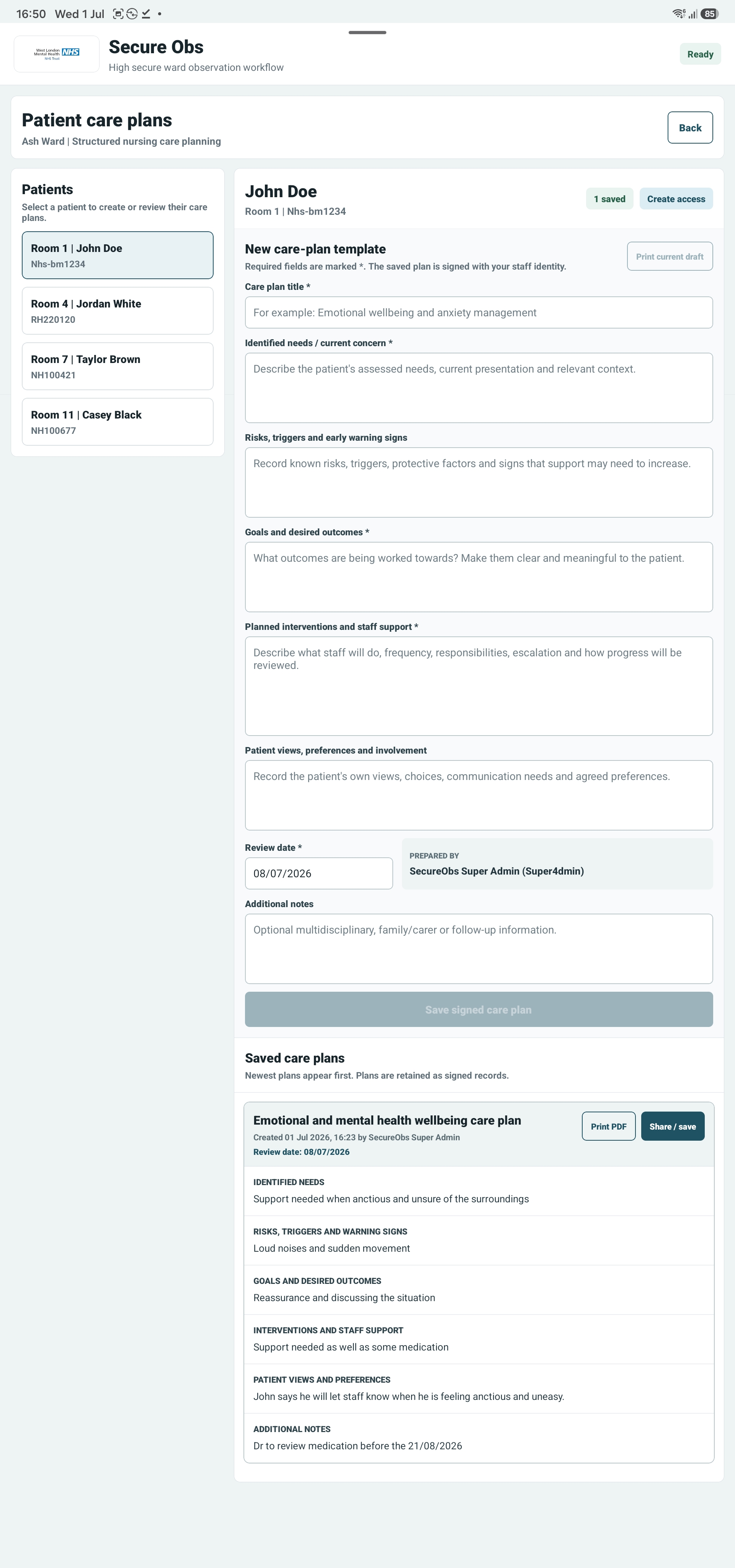
See the complete workflow: structured clinical fields, review date, signed saving, saved plans and PDF sharing. Select the image to view it full size.
Governance by design
SecureObs is built for environments where the record matters. Staff access, failed sign-ins, observations, patient notes, care plans, medication actions, settings changes and patient form completion can all be tied back to staff identity and time. Analytics and handovers use those attributable records rather than creating a separate, disconnected version of events.
NFC, STAFFCODE and PIN sign-in with lockout controls
Manager-led NFC staff tag writing when permanent staff are created or updated
Role permissions for nurses, HCF, OT, security, managers, doctors and super admin
Immutable audit events for access, observations, patient notes, care plans, medications, TESO, settings and forms
Signed shift handovers and traceable analytics linked to their underlying ward records
RAG-rated safety incidents with acknowledgement, ownership and documented resolution
Consent-controlled family access with expiring invitations, revocation and attributable staff review
Organisation and ward filtering for multi-site deployments
Offline queue with individual retry instead of throwing away pending work
Information security and service resilience
SecureObs combines individual staff authentication, role and ward permissions, expiring sessions, encrypted HTTPS communication and attributable records. Supported observations and essential records can be held locally when connectivity is interrupted and synchronised after an authorised staff member reconnects.
NFC or STAFFCODE and PIN sign-in, failed-attempt lockouts and time-limited temporary access.
Important activity is tied to staff identity, time, organisation and relevant record context.
Full PostgreSQL backup every 24 hours, six-day retention and continuous point-in-time recovery.
Staff can see what is waiting and SecureObs never silently treats an unsynchronised record as uploaded.
Customer-specific hosting, privacy, subprocessor, recovery and security-assurance questions are answered during procurement.
Request security information
Flexible packages
Every deployment is configured around the organisation, sites and wards that will use it. Optional modules cost £45 per ward/month and can be added to Essential. Tablet hire is £37.99 per tablet/month. Larger packages bring connected clinical, workforce and governance tools together.
Essential
From £149 per ward/month
For smaller care homes and single-ward services.
Professional
From £299 per ward/month
For growing services needing connected clinical and workforce tools.
Enterprise
From £1,499 per organisation/month
For larger and multi-site providers.
Hospital
Tailored pricing
For hospitals, secure services and NHS organisations.
Optional add-ons
Medication/eMAR, rostering, security checks, analytics, CQC evidence and governance reporting, desktop notes and care-plan writing, family sharing, additional wards, NFC staff cards, training and priority support can be scoped separately.
Final pricing depends on organisation size, ward numbers and implementation requirements.
Flexible deployment
Smaller services can use the managed SecureObs platform, while hospital deployments can be scoped around dedicated data, integration and implementation requirements.
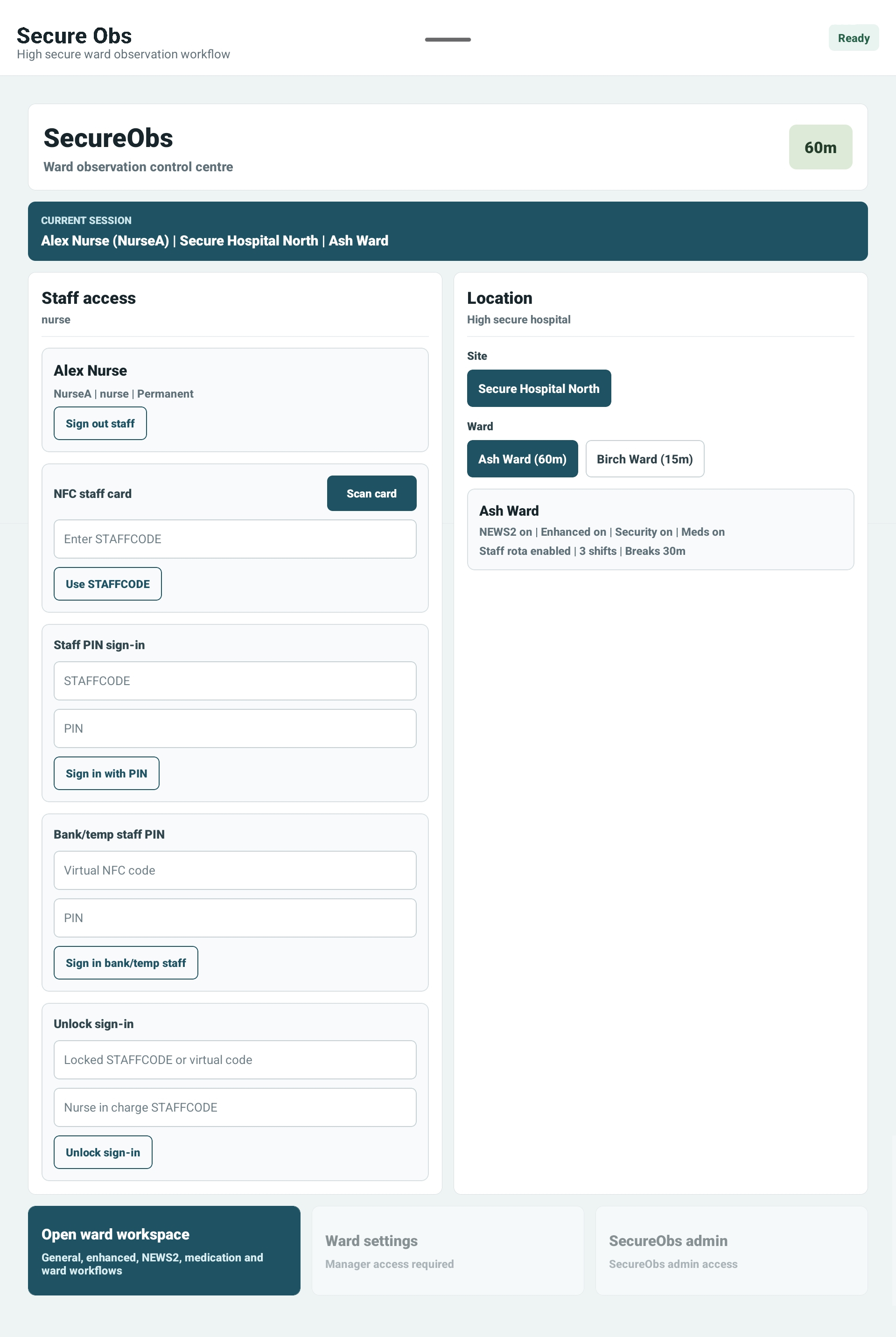
Staff only see authorised sites and wards after sign-in, with separate handling for permanent and temporary staff.